OneCleaner
- 3.5
- Rating
- 500.00K
- Installs
- Free
- Price

 Analysis by App-foxy
When a phone starts warning me about low storage, I usually do not need another complicated dashboard. I need a quick way to see what is taking up space, remove obvious clutter, and avoid deleting something I may regret later. OneCleaner, from Science VR, is built around that practical problem. It is a free tools app for Android that focuses on storage management, large files, and duplicate photos rather than trying to become an all-purpose phone optimizer.
I approached it as the kind of utility I would keep available for occasional cleanups, not something I would constantly monitor. That distinction matters. Storage cleaners can be useful when a device is crowded, but they also make decisions around personal files, so a clear review process is more important than flashy promises. My overall impression is that OneCleaner is most appealing to people who want a simple starting point for finding space, while users who prefer detailed manual control may find its streamlined approach limiting.
How OneCleaner handles a crowded phone
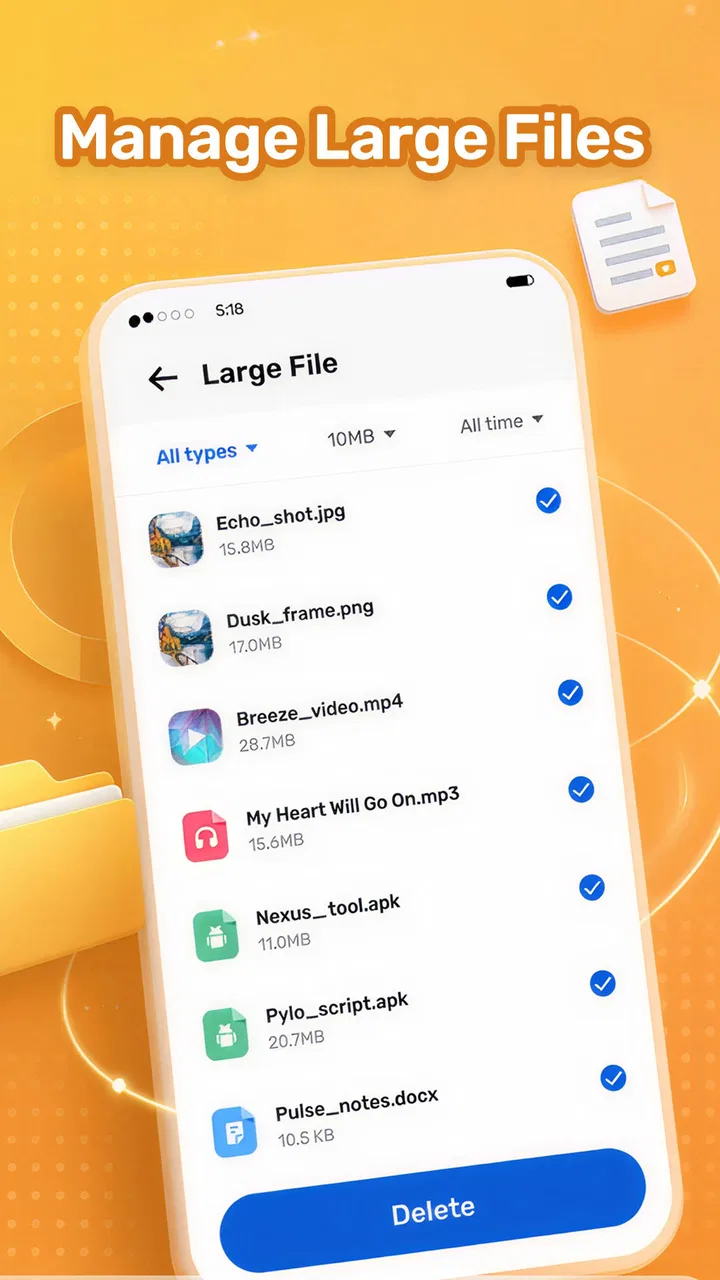
The app’s main purpose is easy to understand: help manage storage by drawing attention to large files and duplicate photos. That gives it a narrower focus than many utility apps that bundle memory boosting, battery claims, security scans, and unrelated shortcuts into one screen. I prefer this approach because it keeps the central task visible. If my goal is to reclaim space, I want the app to stay focused on files that are actually consuming it.
You May Also Like

 Blood Strike: 2.5 Anniversary
Blood Strike’s Loadouts Turn Every Drop Into a Tactical Gamble
A close look at Blood Strike’s custom loadouts: how fast access to signature weapons reshapes its battle royale rhythm, rewards preparation, and narrows the gap between fights.

 Pandora - Music & Podcasts
Pandora’s Music Is Easy to Start, but Harder to Recover
Pandora’s strength is its low-effort path from a seed to a station. Its weak spot is how much confidence it asks you to place in connection, setup, and quiet recovery.

 8 Ball Pool
 Is Built on Rivalries, Rematches, and Routine
A close look at the rivalries, rematches, shared routines, and unanswered safety questions that turn a quick pool match into a persistent mobile community.

 Samsung Music
’s Quiet Strength Is Playing What You Already Own
Its reach comes less from spectacle than from dependable access to a personal library. That simplicity is both the app’s strongest retention engine and its ceiling.

 AccuWeather: Weather Radar
AccuWeather Review: A Quick, Clear Forecast for Everyday Decisions
For everyday plans, the best forecast is the one you can understand quickly. AccuWeather makes rain timing, radar, and local conditions easy to act on, with a few trade-offs.

 Hill Climb Racing
Why Hill Climb Racing Still Turns Crashes Into One More Run
A tiny car, a bumpy hill and one more upgrade: Hill Climb Racing keeps resurfacing because its simple chaos makes every near-miss feel personal.
More From Our News Desk



In everyday use, the most useful starting point is a scan of the areas that are likely to contain avoidable clutter. Large videos, downloads, old exported files, and repeated images can quietly accumulate, especially when a phone is used for messaging, social media, and photography. OneCleaner’s value comes from turning that buildup into a reviewable list instead of forcing me to browse folders one by one.
That does not mean every suggested item should be removed automatically. A large file may be important, and a duplicate-looking photo may be a slightly different edit that I want to keep. I would treat the app as a discovery tool first and a deletion tool second. The safest workflow is to scan, inspect, protect anything important, and only then clean. That habit is more valuable than pressing a single cleanup button without checking what is selected.
The duplicate-photo focus is especially relevant for people who receive many images through chats or repeatedly save the same picture from different apps. A phone can end up with several copies that look identical at a glance, but I would still compare them before removing anything. Resolution, cropping, edits, and the location of the original can matter. A cleaner that helps surface those copies saves time, but the final decision should remain deliberate.
What the free price means in practice
OneCleaner is available at no cost, so the basic value question is straightforward: there is no purchase price standing between a user and trying the app. That makes it easy to test during a storage emergency or use as a second opinion alongside the phone’s own storage settings. For someone who only needs occasional cleanup, free access makes the experiment low-risk financially.
At the same time, free does not automatically mean that every user will find it worthwhile. The real return depends on whether the app identifies clutter more conveniently than the tools already built into the phone. Android’s native storage screen can often show broad categories, while a file manager can provide direct folder-by-folder control. OneCleaner earns its place when its focused presentation helps me spot large items or repeated photos faster than those alternatives.
I would not choose it because of an expectation that it will transform general phone performance. Its clear purpose is storage management. If a device feels slow because of an aging battery, a demanding app, limited memory, or a system problem, deleting files may not solve that issue. The free price makes it reasonable to try, but it should be judged by the space it helps me review and reclaim, not by unrelated performance promises.
Where the app delivers useful value
The strongest benefit is convenience. Manually checking every photo folder and download location is tedious, especially when the phone has been used for years. A focused cleaner gives me a single place to begin. That is helpful for family members who are uncomfortable navigating file systems, and it can also save time for experienced users who do not want to perform a complete manual audit every few weeks.
Large-file discovery is useful when storage disappears suddenly. One long video can occupy far more room than dozens of small documents, yet it is easy to forget that the file exists after sharing or recording it. I would use this view before deleting a random collection of small files. It encourages a better trade-off: remove one unnecessary item with a meaningful size rather than disturbing many files that may still be useful.
Duplicate-photo review offers a different kind of value. It addresses gradual clutter rather than a single obvious file. My practical tip is to begin with images that are clearly repeated, such as multiple copies of a forwarded picture, and leave similar-looking personal photos for a slower review. This reduces the chance of losing an edited version or a memory that only appears redundant because the thumbnails are close.
Another useful workflow is to clean before a specific task rather than waiting until the phone is unusable. Before traveling, recording an event, installing a large application, or downloading offline media, I would check for large files and repeated photos. That turns OneCleaner into a preparation tool: I can create breathing room while I still have time to review items calmly, instead of deleting hurriedly after a storage warning appears.
It can also help when moving between devices. Before backing up or transferring a photo library, removing obvious duplicates may reduce the amount of material that needs to be copied. I would only do this after confirming that the remaining files are backed up or otherwise safe. The app can help organize the decision, but it should not replace a backup plan.
The tradeoffs I noticed while judging it
The main tradeoff is simplicity versus control. A focused cleaner can be easier to understand than a full file manager, but people who want exact folder paths, file extensions, sorting rules, or detailed archive management may prefer the native file browser. OneCleaner is better suited to guided discovery than to precise manual administration.
Deletion also requires caution because storage tools operate close to personal data. Photos are not interchangeable just because they share a visual appearance, and a large file is not automatically disposable. I would avoid cleaning while distracted, and I would review selections in batches rather than approving everything at once. This is particularly important for screenshots containing receipts, travel documents, work material, or family images.
There is a second tradeoff between occasional usefulness and ongoing necessity. If my phone has plenty of free space and my photo library is already organized, I may not need a dedicated cleaner often. In that situation, the built-in storage tools may be enough. OneCleaner becomes more valuable when clutter is difficult to locate, when duplicate photos have accumulated, or when the user wants a simpler interface than a conventional file manager provides.
I also would not confuse a storage cleanup with a privacy cleanup. Removing visible files may free room, but it does not automatically mean that every copy, cache, cloud version, or account attachment has disappeared. Anyone handling sensitive material should understand where the original files are stored and whether they need to be preserved elsewhere before cleaning. That is a general discipline I would apply particularly carefully with an app centered on deletion.
Everyday situations where it makes sense
Imagine a phone used for family group chats. Over time, the same birthday pictures, short videos, and forwarded images may be saved repeatedly. The owner receives a low-storage warning before a weekend event and does not want to spend an hour opening folders. OneCleaner can provide a focused place to look for repeated photos and unusually large files. I would review the results, keep the best copy of each image, and leave anything uncertain until after the event.
Another scenario is a phone used for work and personal photography. Large presentations, exported videos, and camera files can coexist with years of photos. Here, the large-file view is more useful than a general “clean everything” approach because it helps identify the few items that will make the biggest difference. I would move important work files to their proper storage first, then revisit the remaining list for disposable material.
For a less technical user, the app’s narrow purpose can be reassuring. They may not want to understand every Android folder or manage files through a complex interface. A guided review of large files and duplicate photos is easier to explain than a long list of system categories. I would still show them how to inspect each selection, because ease of use should not come at the cost of accidental deletion.
On the other hand, a photographer with carefully organized albums may find duplicate detection too blunt for their workflow. Similar images can be intentional: alternate exposures, edited versions, or files prepared for different uses. That person is better served by a photo manager with album, metadata, and version controls. OneCleaner is more convincing for everyday clutter than for professional asset management.
Compatibility, trust, and who should try it
The app supports Android devices running version 7.0 or later, which covers a broad range of phones. That is useful for households with older devices, although the experience can still vary depending on the phone’s manufacturer and file organization. OneCleaner is listed for everyone, and its tools are relevant to ordinary personal storage rather than a specialized professional audience.
Science VR is the developer behind the app. OneCleaner has passed the half-million-install mark and holds an average rating of 3.5 from roughly five hundred ratings. Those figures suggest that it has attracted a meaningful audience, while the middling average is a reason for me to keep expectations realistic. I would install it to evaluate its workflow on my own phone, not assume that the rating guarantees a perfect match for every device.
The current version is 1.3.0. When I use a cleaner, I would pay attention to how clearly it labels files, whether previews are understandable, and whether the review process gives me enough control before removal. Those details matter more than a polished scan animation. A storage app should make uncertainty visible rather than encouraging quick approvals.
Because it is a tool that may display personal photos and files, I would also take a moment to read the app’s permission prompts and privacy information before granting access. That is not a criticism unique to OneCleaner; it is the sensible standard for any application that needs to inspect storage. If a user is unwilling to give a cleaner access to those files, the phone’s built-in storage manager may be the more comfortable choice.
How it compares with built-in tools and file managers
The built-in Android storage settings are the obvious alternative. They are already present, require no extra installation, and are often enough for checking broad storage categories. Their weakness is that they may not present the exact combination of large files and duplicate photos in the way a dedicated cleaner does. I would choose the native option for a quick overview and OneCleaner when I want a more focused cleanup session.
A standard file manager offers deeper control. It is the better choice when I need to rename, move, archive, sort, or inspect files by location. The downside is that this flexibility can make cleanup slower and more intimidating. OneCleaner takes the opposite position: less general file administration, more attention on common sources of visual clutter.
Photo-management apps can be preferable for people whose main problem is an extensive image library. They may offer albums, edits, backups, and more context around each picture. OneCleaner’s advantage is concentration on storage recovery rather than the whole photo-management experience. I would use it for a targeted cleanup, not as a replacement for a complete photo library system.
The right choice therefore depends on the problem. If I need to understand where storage is going, the native settings are a sensible first step. If I need total control, I want a file manager. If I need to review repeated photos and large files in one focused utility, OneCleaner is the more direct option. Its free cost makes trying that middle ground reasonable.
My verdict on the value
I would recommend OneCleaner to Android users who regularly run short of space, have accumulated repeated photos, or want a simpler alternative to manually searching through folders. Its best quality is focus: it points attention toward large files and duplicate images, two areas where a careful review can produce useful results without a complete reorganization of the phone.
I would skip it if my device already has comfortable free space, if I need advanced file-management controls, or if I expect a cleaner to fix general performance problems. I would also avoid treating any cleanup app as an automatic authority over personal files. The app is most useful when I remain involved in the decision and use it to surface candidates for removal.
As a free tools app from Science VR, it offers an accessible way to test a focused storage workflow without committing money. The 3.5 average rating means I would approach it with balanced expectations, but the concept is practical and the audience size shows that the problem it addresses is familiar to many Android users. For me, the deciding question is simple: does it help me find unwanted large files or duplicate photos faster than my existing tools? If the answer is yes, it earns a place for periodic cleanups.
My final view is favorable, with an important condition. OneCleaner is a useful inspection assistant, not a substitute for judgment or backups. Used carefully, it can make an unpleasant storage problem easier to handle, especially before a trip, a major download, or a phone transfer. Users wanting a guided, free way to review common clutter should give it a try; users seeking deep file control or automatic device optimization should choose a different kind of tool.
FAQs for OneCleaner
01What is OneCleaner, and what does it do?
OneCleaner is designed to help organize and maintain your mobile device by identifying unnecessary files, cached data, duplicate items, and other storage-consuming content. After reviewing its available tools, users can generally scan their device, inspect the results, and decide what to remove. Its usefulness depends on the device, operating system, permissions, and the types of files the app can access.
02Is OneCleaner safe to use on an Android or iPhone?
OneCleaner can be useful when handled carefully, but users should review every cleaning recommendation before confirming deletion. Cleaning apps may request access to storage, photos, contacts, or other personal information depending on the platform. Download the application only from an official store, check its privacy policy, and avoid granting permissions that are unrelated to the cleaning features you intend to use.
03Can OneCleaner delete important photos, videos, or files by mistake?
There is always some risk when an automated cleaner suggests files for removal, especially when duplicate photos, large media, downloads, or cached content are involved. Before using the final clean option, carefully inspect the selected items and keep backups of anything important. Do not assume that every recommendation is disposable, and check the recycle or recovery options if the app provides them.
04Does OneCleaner really improve device performance and free storage?
OneCleaner may recover storage by removing temporary files, unwanted downloads, duplicate content, or other items that are no longer needed. However, the performance improvement may be modest if your device already has sufficient free space. Cleaning cached data can also be temporary because applications recreate those files. The app should be viewed as a maintenance utility rather than a guaranteed solution for every slowdown.
05Is OneCleaner free, and does it include advertisements or subscriptions?
The cost and available features may vary according to the version, operating system, region, and store listing. Some cleaning applications offer basic scanning for free while placing advanced tools behind advertisements, in-app purchases, or a recurring subscription. Before downloading or starting a trial, check the current Google Play or App Store description, pricing details, renewal terms, and cancellation instructions.
Pros
- Quickly identifies large
- duplicate
- and unnecessary files
- Simple interface makes storage cleanup easy for beginners
- Helps organize photos
- videos
- and other media by category
- Can free up space without requiring advanced technical knowledge
- Useful for finding forgotten files that are taking up storage
Cons
- Some cleanup suggestions may require careful manual review
- Scanning large storage libraries can take noticeable time
- Results may vary depending on device permissions and file access
- Aggressive cleanup could remove files you intended to keep
- Extra features or an ad-free experience may require payment

OneCleaner
Gallery